Never Miss MLS Kickoff
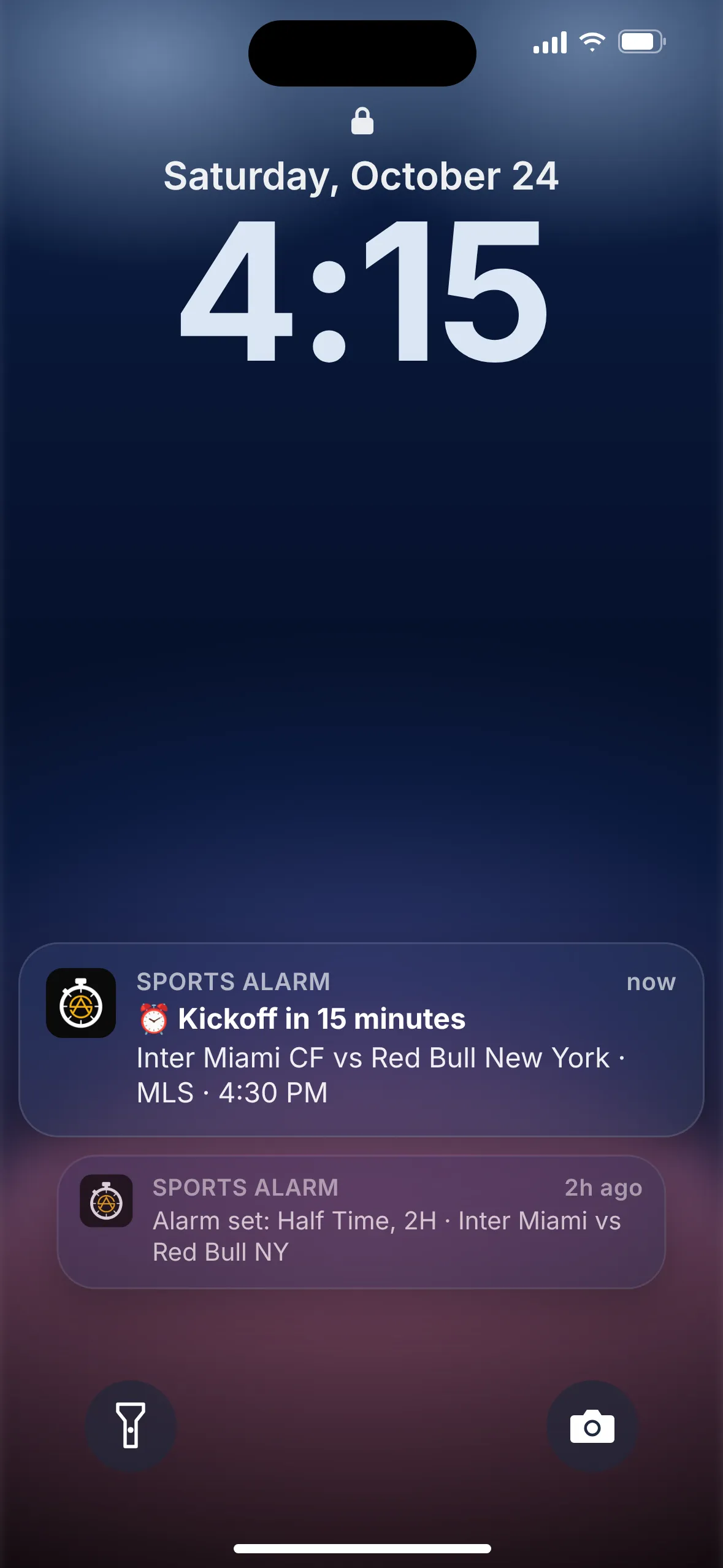
Sports Alarm sounds a loud alarm before kickoff, at halftime or when the half you care about starts. Pick your game, choose your alarms, and get on with your day. We'll tell you when it's time.

Free on iOS & Android · Rated 5.0 ★ on the App Store
Weekend soccer, spread across the whole country
MLS clubs stretch from coast to coast, so kickoff times move around depending on who's playing and where. A Saturday afternoon game in the East can be lunchtime out West, and a late kickoff in California can run well past bedtime for fans back East. Keeping track of when your club is on is easy to get wrong.
Soccer doesn't stop for commercials, either. Goals can come in the opening minutes or deep into stoppage time, and the halftime break is just long enough to wander off and forget to come back. Miss the start of the second half and you might miss the goal that decides it.
Playoff game going the distance? Turn on the ET alert and Sports Alarm will let you know when a game heads into extra time, so you're back in front of the screen for the finish.
How it works in 3 steps
Setting an MLS alarm takes less time than a throw-in.
Pick MLS
Open Sports Alarm and choose MLS from the list of sports.
Find your game
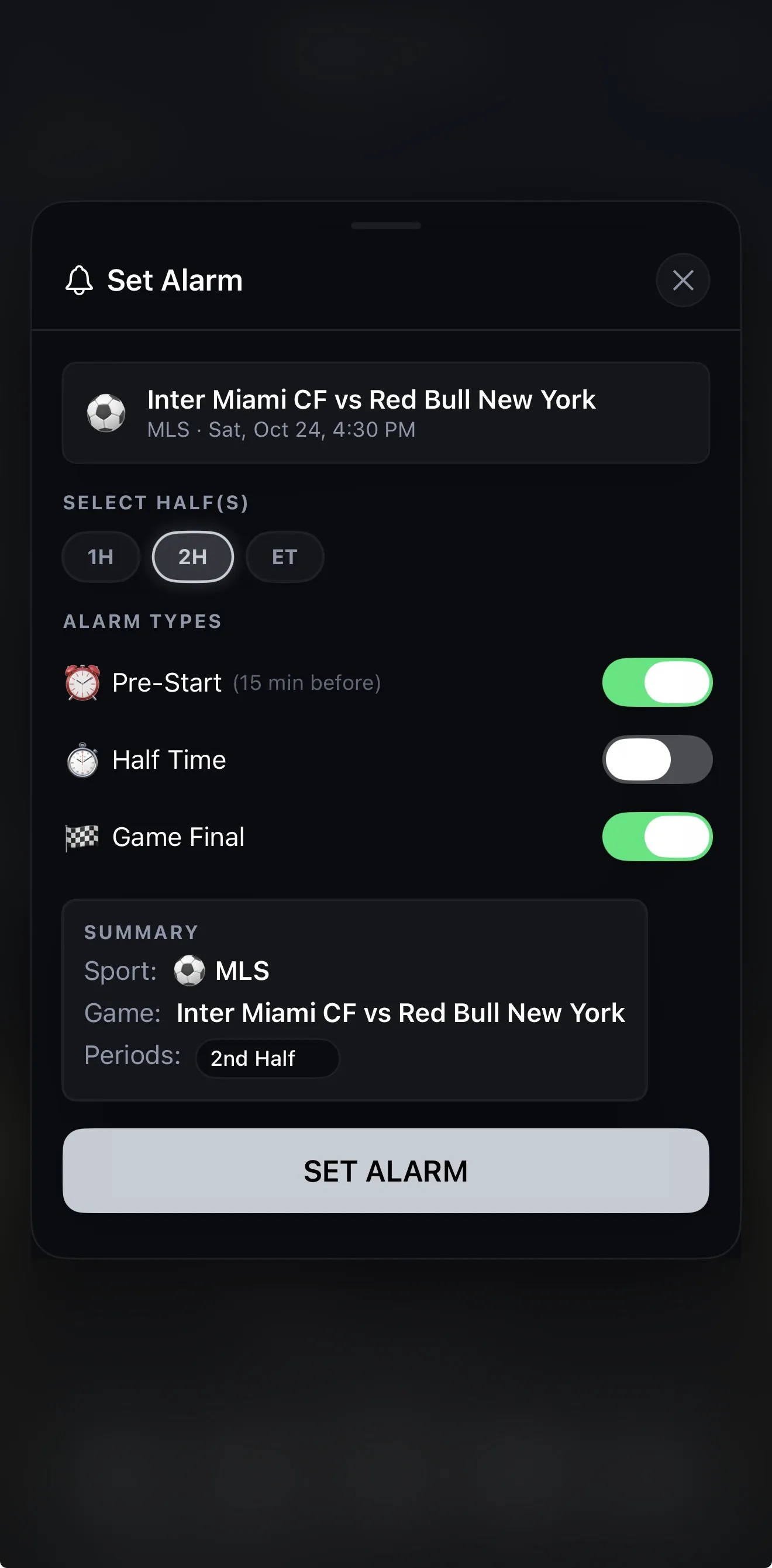
Scroll the schedule or save your clubs as favorites, then tap the game you want, like Inter Miami CF vs Red Bull New York.
Choose your alarms
Turn on Pre-Start (15 minutes before kickoff), Half Time, Game Final, or alerts for 1H, 2H and ET (extra time).
Built for soccer fans
Sports Alarm does one job: making sure you don't miss the moments you care about.
Kickoff, halftime, final
Pre-Start, Half Time and Game Final alarms for any MLS game, plus half alerts for 1H, 2H and extra time (ET).
Loud enough to notice
A loud, persistent alarm, not a quiet notification that gets lost on your lock screen. You'll notice it even across the room.
Works in the background
Our servers monitor the game and push alerts to your phone, so the app doesn't need to stay open.
Favorites
Save your teams so their games are easy to find all season long.
Live scores
Check live scores in the app, and on your Apple Watch if you wear one.
12 languages
Use the app in the language you're most comfortable with.
Step away at halftime
Grab a snack or run an errand during the break. Pick 2H, and Sports Alarm will give you a heads-up when the second half is getting under way. If a game goes to extra time, an ET alert means you'll be there for that too.
Not just match day
The same alarms work across the rest of your sports calendar. Sports Alarm also covers:
NFLNBAMLBNHLMLSEPLNCAAFUFC
MLS FAQ
What MLS alarms can I set?
Three types: Pre-Start, about 15 minutes before kickoff; Half Time; and Game Final, when the game ends. Turn on any combination for any game.
Can I get an alarm for a specific half or extra time?
Yes. For MLS games you can select 1H, 2H or ET, so you can be alerted when the first half, the second half or extra time starts.
Does it show kickoff in my time zone?
Yes. Sports Alarm uses your phone's local time, so every MLS kickoff shows up in your own time zone wherever you are.
Will the alarm go off if my phone is locked or the app is closed?
Yes. Sports Alarm's servers monitor the game and push alerts to your phone, so it works in the background. You don't need to keep the app open.
Is Sports Alarm free?
Yes. Sports Alarm is free to download on the App Store and Google Play, and it's rated 5.0 on the App Store.
Does it cover other sports?
Yes. Besides MLS, Sports Alarm covers the NFL, NBA, MLB, NHL, the Premier League, college football (NCAAF) and UFC.

Set your kickoff alarm before the next game
Download Sports Alarm free, pick this week's game, and let the alarm tell you when it's time.